Scope Agent for subcontractor buyout
Turn project drawings and specifications into organized scopes of work. Review requirements, assign responsibilities across trades, and export Word packages for final review before issuing subcontracts.
For GC and construction management teams responsible for subcontractor scopes and buyout.

Trusted by leading construction companies
























Customer result
on the first project scoped with Provision

ProWest Constructors reported saving three to four days and identifying several scope gaps on its first project. Its team uses Provision to bring scope information together before completing its review.
Customer-reported result on a specific project. Time saved relates to scoping work, not the full buyout cycle.
The job
Your team has drawings, specifications, and trade proposals to work through. Before subcontracts go out, someone has to turn that information into clear responsibilities for each trade.
Scope Agent organizes requirements from the project documents so your team can focus on the decisions: what belongs in each package, what needs clarification, and what is ready to issue.
Workflow
Start with the developed document set for the project you're buying out.
Check extracted scope against the drawings and specifications. Review suggested coordination and inferred items before including them.
Edit descriptions and reassign requirements to match your project's trade responsibilities.
Generate Word scopes, reconcile them with agreed trade proposals, and complete your team's checks before issue.
A requirement affecting electrical work may sit on a structural drawing. A waterproofing responsibility may appear in a related specification. Those interfaces deserve attention before the scope is attached to a subcontract.
Scope Agent brings requirements from across the uploaded document set into your review, helping your team ask better questions about who owns the work.

Concrete may be one package on one job and several on the next. Insulation may sit with drywall, cladding, or another trade.
Review and reassign requirements to reflect how you're buying this project. Edit the language, check the sources, and keep final control over the scope you issue.


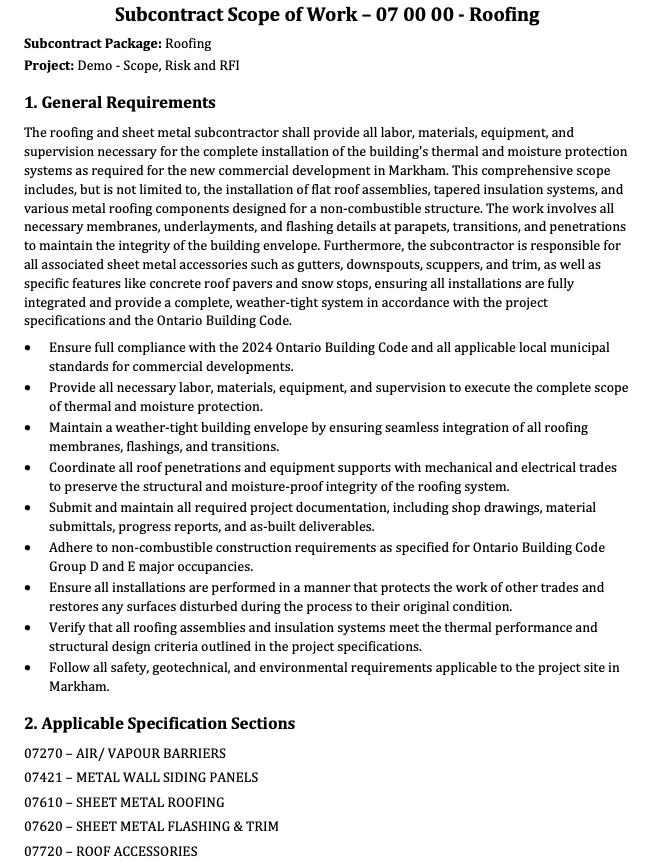
Each subcontract package becomes a Subcontract Scope of Work document. Export the packages you select as Word documents, PDFs, or an Excel workbook, and finish the review in the tools your team already uses.
Project managers, commercial leads, procurement and buyout teams, and estimators at GCs and construction managers who prepare subcontractor scopes.
When you have developed drawings and specifications and subcontract packages still to prepare. Begin before your team finishes writing the scopes.
Yes. Review and reassign requirements to reflect your project's subcontract packages.
Yes. Export Word scope packages for final review and formatting.
This workflow prepares scopes from project documents. Your team still reconciles trade proposals, confirms inclusions and exclusions, and agrees commercial terms.
See how Scope Agent helps your team prepare subcontractor scopes from the project documents and move packages toward issue.